
Documentation Index
Fetch the complete documentation index at: https://docs.textin.com/llms.txt
Use this file to discover all available pages before exploring further.
信息抽取是将解析后的文档内容提取并转换为结构化数据的过程。通过定义 JSON Schema,您可以指定要抽取的字段名称、类型和描述,系统会根据您定义的配置进行抽取。
与简单提取文本不同,xParse 的信息抽取功能能够:
- 结构化提取:根据定义的 JSON Schema 提取结构化数据
- 坐标定位:支持返回每个字段在文档中的坐标位置
- 印章识别:支持识别文档中的印章信息
- 类型转换:根据字段类型自动进行格式转换
信息抽取的主要用途:
- 表单数据提取:从发票、合同、订单等表单中提取关键信息
- 结构化数据生成:将非结构化文档转换为结构化 JSON 数据
- 数据录入自动化:自动提取文档数据并录入到业务系统
- 信息验证:提取信息后进行数据验证和校验
- 文档分析:提取关键信息用于文档分析和处理
参数说明
schema
类型: object
必填: 是
JSON Schema定义,用于指定要抽取的字段结构。参考JSON Schema结构说明了解详细的schema定义方法。
Schema 必须遵循 JSON Schema 规范,最外层 type 必须为 “object”,properties 中定义要抽取的字段。
generate_citations
类型: boolean
必填: 否
默认值: false
是否生成引用信息(坐标位置)。
当设置为 true 时,返回结果中的 citations 字段会包含每个抽取字段的坐标信息,包括:
- value:该字段的抽取结果
- bounding_regions:抽取结果对应的坐标位置
- page_number:所在页码,从1开始
- text:边界框所在区域内的文本内容
- position:坐标位置,长度为8的数组,表示四个顶点的像素坐标 [左上x, 左上y, 右上x, 右上y, 右下x, 右下y, 左下x, 左下y]
stamp
类型: boolean
必填: 否
默认值: false
是否调用印章识别。
当设置为 true 时,返回结果中的 stamps 字段会包含文档中的印章信息,包括:
- color:当前印章颜色(红色、蓝色、黑色、其他)
- position:印章的坐标信息
- stamp_shape:当前印章形状(圆章、椭圆章、方章、三角章、菱形章、其他)
- type:当前印章类型(公章、个人章、专用章、其他、合同专用章、财务专用章、发票专用章、业务专用章)
- value:印章的文本内容
JSON Schema 结构说明
我们使用JSON Schema来定义要抽取的数据结构,在遵循 schema 规范的基础上,剔除了一些不必要的字段,文档抽取使用的 schema 字段如下:
- type:schema的类型,最外层固定为
object
- properties:抽取字段的集合
- <name>:要抽取的字段名称,由用户自定义,每个字段包含以下信息:
- type:要抽取的字段类型,参考支持的字段类型列表
- description:要抽取的字段描述
- enum:当type为
enum时,该字段表示抽取字段的枚举值列表
- items:当type为
array时,该字段表示要抽取的列表中的字段集合,与properties类似
- required:指定抽取必要字段,其顺序表达了抽取输出的字段顺序,仅在type为
object时需要。
在定义要抽取的数据时,您需要为每个字段提供一个名称,以及确定该字段的类型。您还可以添加可选的字段描述为大模型提供更多的上下文,帮助文档抽取准确了解需要从文档中查找和提取哪些信息。字段名称和描述越具体、表义越明确,文档抽取就越能准确地识别和抽取文档中的正确数据。
JSON Schema 结构示例
{
"type": "object",
"properties": {
"field_name": {
"type": ["string","null"],
"description": "Field description"
},
"table_name": {
"type": "array",
"description": "Table description",
"items": {
"type": "object",
"properties": {
"name": {
"type": ["string","null"],
"description": ""
},
"category": {
"type": ["string","null"],
"description": ""
}
},
"required": [
"name",
"category"
]
}
}
},
"required": [
"field_name",
"table_name"
]
}
JSON schema 支持的字段类型
- string:字符串
- number:数字
- integer:整数
- enum:枚举
- object:对象,对象内可以包含以下类型:string、number、integer、enum。
- array:数组,数组内可以包含以下类型:string、number、integer、enum、object。
请注意,在JSON schema中array、object类型均支持层级嵌套结构,以便于抽取如表格或者具有多个属性的实体对象。目前文档抽取仅支持最多不超过3级的嵌套。
type可以设置为字符串(如"type": "string")或者包含null的数组(如"type": ["string", "null"]),即使type不带null,接口底层也会默认带上null,当抽取不到数据时,接口统一返回null值。
JSON schema 支持的字段数量
为了获得最佳性能,保障抽取的精度和速度,在JSON schema中包含的最低层级(叶子节点)字段数量限制总计应不超过100个。
输出结果说明
extract 阶段返回一个抽取结果对象,包含以下字段:
- success_count:成功处理的文档页数
- extracted_schema:结构化的抽取结果,以json格式返回,与抽取时传入的schema定义的结构一致
- citations:抽取结果的详细信息,包含坐标位置(仅在 generate_citations=true 时返回),结构与schema定义一致
- stamps:印章相关信息(仅在 stamp=true 且文档中包含印章时返回)
- pages:文档页面相关信息
xParse提供了两种方式使用Extract功能:
在Pipeline API中使用Extract作为第二个stage,必须与Parse组合使用。
适用场景:
- 需要在自动化工作流中使用抽取功能,与连接器生态集成
- 需要批量处理文档
API文档:Pipeline API
使用限制:
- Extract必须与Parse组合使用
- Extract必须在Parse之后
- 不支持与chunk、embed同时使用
直接调用Extract API,内部会自动调用Parse,然后进行抽取。
适用场景:
API文档:Extract同步API
使用教程:详细的使用示例和最佳实践请参考API使用指南。
对比和选择建议
| 特性 | Pipeline Extract | Extract API |
|---|
| 适用场景 | 需要批量处理 | 只需要抽取 |
| 批量处理 | 支持 | 需要自行实现 |
选择建议:
- 只需要抽取结果:两种方式都可以,根据是否需要批量处理选择
- 批量处理:使用Pipeline API(parse + extract)
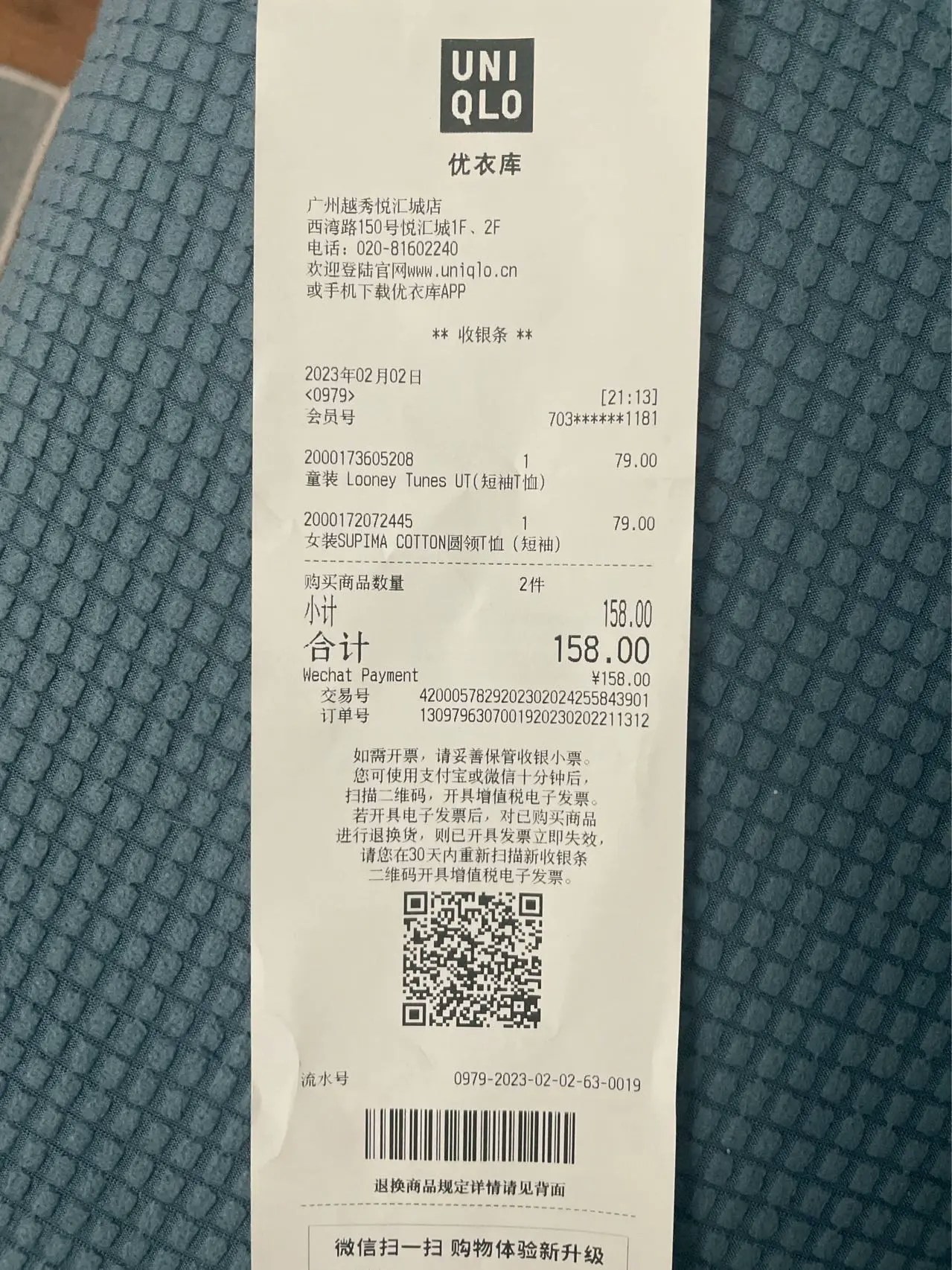
返回结果示例
{
"code": 200,
"message": "success",
"x_request_id": "req_1234567890abcdef",
"data": {
"extract_result": {
"success_count": 1,
"extracted_schema": {
"商品": "童装 Looney Tunes UT(短袖T恤)女装SUPIMA COTTON圆领T恤(短袖)"
},
"citations": {
"商品": {
"value": "童装 Looney Tunes UT(短袖T恤)女装SUPIMA COTTON圆领T恤(短袖)",
"bounding_regions": [
{
"page_number": 1,
"position": [137, 599, 1129, 599, 1129, 625, 182, 625],
"text": "童装 Looney Tunes UT(短袖T恤)"
}
]
}
},
"pages": [
{
"page_number": 1,
"image_id": "62bfe3c3a8e9c9cf.jpg",
"height": 1824,
"width": 600,
"angle": 0,
"status": "Success",
"durations": 930.178466796875
}
]
},
"stats": {
"success_count": 1,
"original_elements": 10,
"chunked_elements": 0,
"embedded_elements": 0,
"stages": [
{"type": "parse", "config": {"provider": "textin"}},
{"type": "extract", "config": {"schema": {...}, "generate_citations": false, "stamp": false}}
]
}
}
}
{
"code": 200,
"msg": "success",
"data": {
"file_id": "xxx",
"status": "completed",
"result": {
"success_count": 1,
"extracted_schema": {
"商品": "童装 Looney Tunes UT(短袖T恤)女装SUPIMA COTTON圆领T恤(短袖)"
},
"citations": {
"商品": {
"value": "童装 Looney Tunes UT(短袖T恤)女装SUPIMA COTTON圆领T恤(短袖)",
"bounding_regions": [
{
"page_number": 1,
"position": [137, 599, 1129, 599, 1129, 625, 182, 625],
"text": "童装 Looney Tunes UT(短袖T恤)"
}
]
}
},
"pages": [
{
"page_number": 1,
"image_id": "62bfe3c3a8e9c9cf.jpg",
"height": 1824,
"width": 600,
"angle": 0,
"status": "Success",
"durations": 930.178466796875
}
]
}
}
}
使用示例
from xparse_client import (
Pipeline,
LocalSource,
LocalDestination,
Stage,
ParseConfig,
ExtractConfig
)
# 创建数据源
source = LocalSource(
directory='./documents'
)
# 创建目标存储
destination = LocalDestination(
output_dir='./output'
)
# 创建解析配置
parse_config = ParseConfig(
provider='textin'
)
# 创建抽取配置
extract_config = ExtractConfig(
schema={
"type": "object",
"properties": {
"商品": {
"type": ["string", "null"],
"description": "商品名称"
},
"商品列表": {
"type": "array",
"description": "商品列表",
"items": {
"type": "object",
"properties": {
"名称": {
"type": ["string", "null"],
"description": "商品名称"
},
"类型": {
"type": ["string", "null"],
"description": "商品类型"
}
},
"required": ["名称", "类型"]
}
}
},
"required": ["商品", "商品列表"]
},
generate_citations=False,
stamp=False
)
# 创建 Pipeline
pipeline = Pipeline(
source=source,
destination=destination,
api_base_url='https://api.textin.com/api/xparse',
api_headers={
'x-ti-app-id': 'your-app-id',
'x-ti-secret-code': 'your-secret-code'
},
stages=[
Stage(
type='parse',
config=parse_config
),
Stage(
type='extract',
config=extract_config
)
]
)
pipeline.run()
import requests
url = "https://api.textin.com/api/xparse/extract/sync"
# 准备文件
with open('document.pdf', 'rb') as f:
file_content = f.read()
# 准备配置
extract_config = {
"schema": {
"type": "object",
"properties": {
"商品": {
"type": ["string", "null"],
"description": "商品名称"
},
"商品列表": {
"type": "array",
"description": "商品列表",
"items": {
"type": "object",
"properties": {
"名称": {
"type": ["string", "null"],
"description": "商品名称"
},
"类型": {
"type": ["string", "null"],
"description": "商品类型"
}
},
"required": ["名称", "类型"]
}
}
},
"required": ["商品", "商品列表"]
},
"generate_citations": False,
"stamp": False
}
# 发送请求
files = {'file': ('document.pdf', file_content, 'application/pdf')}
data = {
'extract_config': json.dumps(extract_config)
}
headers = {
'x-ti-app-id': 'your-app-id',
'x-ti-secret-code': 'your-secret-code'
}
response = requests.post(url, files=files, data=data, headers=headers)
result = response.json()
print(result)
示例 3:启用坐标信息和印章识别
from xparse_client import ExtractConfig
# 创建抽取配置,启用坐标信息和印章识别
extract_config = ExtractConfig(
schema={
"type": "object",
"properties": {
"发票号码": {
"type": ["string", "null"],
"description": "发票号码"
},
"金额": {
"type": ["number", "null"],
"description": "发票金额"
}
},
"required": ["发票号码", "金额"]
},
generate_citations=True, # 启用坐标信息
stamp=True # 启用印章识别
)
相关文档