> ## Documentation Index
> Fetch the complete documentation index at: https://docs.textin.com/llms.txt
> Use this file to discover all available pages before exploring further.
# 快速启动
> 5 分钟快速上手 xParse,从安装到运行第一个文档处理流程
本教程基于 Python 示例分步讲解如何使用 xParse。我们提供了完整的示例代码,可在本地一键运行,助您快速体验 Pipeline 的强大能力。
## 为什么使用 xParse?
在大模型和 RAG 应用开发中,文档处理是关键环节。传统方式需要分别调用解析、分块、向量化等多个接口,流程复杂且容易出错。xParse 通过统一的 Pipeline API,一次性完成文档解析、智能分块和向量化全流程,让您专注于业务逻辑,无需处理繁琐的数据转换。
使用 xParse,您可以:
* ✅ **一键完成全流程**:通过单个 API 调用完成 parse → chunk → embed 全流程
* ✅ **灵活配置处理策略**:根据文档类型选择合适的分块策略和向量模型
* ✅ **无缝对接向量数据库**:处理结果直接存储到 Milvus/Zilliz,无需额外转换
* ✅ **支持批量处理**:自动处理数据源中的所有文档,支持大规模文档处理
如果您正在构建 RAG 应用、知识库系统或 Agent 应用,xParse 会是您的得力助手。
## 如何使用 xParse?
您可以参考以下示例和步骤,快速验证并将 xParse 接入系统。
### 先决条件:获取 [API Key](/pipeline/api-key)
使用 xParse 处理文档前,需要先获取 [API Key](/pipeline/api-key)。请登录后前往 [TextIn 工作台 - 账号与开发者信息](https://www.textin.com/console/dashboard/setting) 获取 `x-ti-app-id` 和 `x-ti-secret-code`。
### 步骤 1:安装依赖
使用 pip 安装 xparse-client 包:
```bash theme={null}
pip install --upgrade xparse-client
```
### 步骤 2:选择创建方式
xParse Pipeline 支持两种创建方式:
1. **手动创建组件**(推荐):手动创建配置对象传入Pipeline,提供更好的类型检查、代码复用和灵活控制
2. **通过配置创建**:使用 JSON 配置,简单直观,适合快速原型开发
### 步骤 3:编写代码
#### 方式 1:手动按模块创建组件(推荐)
更完善灵活的创建逻辑,适合大多数场景:
```python theme={null}
from xparse_client import (
Pipeline,
LocalSource,
LocalDestination,
Stage,
ParseConfig,
ChunkConfig,
EmbedConfig
)
# 创建数据源
source = LocalSource(
directory='/projects/demo/',
pattern=['*.pdf']
)
# 创建目标存储
destination = LocalDestination(
output_dir='/projects/demo/output'
)
# 创建解析配置
parse_config = ParseConfig(
provider='textin' # 解析引擎:textin | textin-lite | mineru | paddle
)
# 创建分块配置
chunk_config = ChunkConfig(
strategy='by_title', # 按标题分块
include_orig_elements=False,
new_after_n_chars=512,
max_characters=1024,
overlap=50 # 块之间重叠 50 字符
)
# 创建向量化配置
embed_config = EmbedConfig(
provider='qwen',
model_name='text-embedding-v3'
)
# 创建 Pipeline
pipeline = Pipeline(
source=source,
destination=destination,
api_base_url='https://api.textin.com/api/xparse',
api_headers={
'x-ti-app-id': 'your-app-id',
'x-ti-secret-code': 'your-secret-code'
},
stages=[
Stage(
type='parse',
config=parse_config
),
Stage(
type='chunk',
config=chunk_config
),
Stage(
type='embed',
config=embed_config
)
]
)
# 运行 Pipeline
pipeline.run()
```
#### 方式 2:通过JSON格式配置创建
这是最简单的方式,适合快速上手:
```python theme={null}
from xparse_client import create_pipeline_from_config
# 完整的配置示例
config = {
# 数据源配置:本地文件系统
'source': {
'type': 'local',
'directory': '/projects/demo/', # 文档目录
'pattern': ['*.pdf'] # 文件匹配模式:['*.pdf'], ['*.pdf','*.docx']
},
# 目标存储配置:本地文件系统(用于测试)
'destination': {
'type': 'local',
'output_dir': '/projects/demo/output' # 输出目录
},
# API 配置
'api_base_url': 'https://api.textin.com/api/xparse',
'api_headers': {
'x-ti-app-id': 'your-app-id', # 替换为您的 app-id
'x-ti-secret-code': 'your-secret-code' # 替换为您的 secret-code
},
# Stages 配置:定义处理流程
'stages': [
{
'type': 'parse',
'config': {
'provider': 'textin' # textin 自研高性能文档解析
}
},
{
'type': 'chunk',
'config': {
'strategy': 'basic', # 分块策略: 'basic' | 'by_title' | 'by_page'
'include_orig_elements': False, # 是否包含原始元素
'new_after_n_chars': 512, # 多少字符后创建新块
'max_characters': 1024, # 最大字符数
'overlap': 0 # 重叠字符数
}
},
{
'type': 'embed',
'config': {
'provider': 'qwen', # 向量化供应商: 'qwen' | 'doubao'
'model_name': 'text-embedding-v3' # 模型名称
}
}
]
}
# 使用配置创建并运行 pipeline
pipeline = create_pipeline_from_config(config)
pipeline.run()
```
### 步骤 4:运行代码
将代码保存为 `run_pipeline.py`,然后运行:
```bash theme={null}
python run_pipeline.py
```
您将看到类似以下的输出:
```
============================================================
Pipeline 初始化完成
Parse Config: ParseConfig(provider='textin')
Chunk Config: ChunkConfig(strategy='basic', ...)
Embed Config: EmbedConfig(provider='qwen', model_name='text-embedding-v3')
============================================================
→ 列出文件...
✓ 本地找到 3 个文件
进度: [1/3]
============================================================
处理文件: example.pdf
→ 读取文件...
✓ 文件读取完成: 245678 bytes
→ 调用 Pipeline 接口: example.pdf
✓ Pipeline 完成:
- 原始元素: 25
- 分块后: 42
- 向量化: 42
→ 写入目的地...
✓ 写入本地: /projects/demo/output/example.json
✓✓✓ 文件处理成功: example.pdf
...
```
## 配置说明
### Source(数据源)配置
#### S3/MinIO 数据源
```python theme={null}
from xparse_client import S3Source
source = S3Source(
endpoint='https://your-minio-server.com', # MinIO 服务器地址
access_key='your-access-key', # 访问密钥
secret_key='your-secret-key', # 秘密密钥
bucket='your-bucket', # 存储桶名称
prefix='', # 可选,文件夹前缀
region='us-east-1' # 区域
)
```
#### FTP 数据源
```python theme={null}
from xparse_client import FtpSource
source = FtpSource(
host='127.0.0.1', # FTP 服务器地址
port=21, # FTP 端口
username='your-username', # 用户名
password='your-password' # 密码
)
```
#### 本地文件系统数据源
```python theme={null}
from xparse_client import LocalSource
source = LocalSource(
directory='./input', # 文档目录(绝对路径或相对路径)
pattern=['*.pdf'] # 文件匹配模式: ['*.pdf'], ['*.pdf','*.docx']
)
```
更多数据源配置参考:[数据源 - Sources](/pipeline/sources)
### Destination(目标存储)配置
#### Milvus 向量数据库
```python theme={null}
from xparse_client import MilvusDestination
destination = MilvusDestination(
db_path='./milvus_pipeline.db', # 本地数据库文件路径
collection_name='my_collection', # 集合名称
dimension=1024 # 向量维度,需与 embed API 返回一致
)
```
#### Zilliz 向量数据库(云端)
```python theme={null}
from xparse_client import MilvusDestination
destination = MilvusDestination(
db_path='https://xxxxxxx.serverless.xxxxxxx.cloud.zilliz.com.cn', # Zilliz 连接地址
collection_name='my_collection', # 集合名称
dimension=1024, # 向量维度
api_key='your-api-key' # Zilliz Cloud API Key
)
```
#### 本地文件系统
```python theme={null}
from xparse_client import LocalDestination
destination = LocalDestination(
output_dir='./output' # 输出目录(绝对路径或相对路径)
)
```
更多目标存储配置参考:[目的地 - Destinations](/pipeline/destinations)
### Parse(解析)配置
解析配置决定了使用哪个引擎解析文档:
| 参数 | 类型 | 说明 | 默认值 |
| ------------ | ------ | ----------------------------------------------------------------- | -------- |
| **provider** | string | 解析引擎 | `textin` |
| | | - `textin`: TextIn 自研高性能解析引擎,在速度、准确性上均为行业领先,适合大多数场景(推荐) | |
| | | - `textin-lite`: TextIn 全文识别解析引擎,适合纯文本、表格图片、电子档 pdf 等场景,速度更快,价格更低 | |
| | | - `mineru`: MinerU 解析引擎,在学术论文等场景表现优异 | |
| | | - `paddle`: PaddleOCR 解析引擎,在多语言和复杂文档场景(如PPT)表现优异 | |
更多解析配置参考:[解析 - Parse](/pipeline/parse)
### Chunk(分块)配置
分块配置决定了文档如何被切分成适合向量化的文本块:
| 参数 | 类型 | 说明 | 默认值 |
| --------------------------- | ------ | --------------------------- | ------- |
| **strategy** | string | 分块策略 | `basic` |
| | | - `basic`: 基础分块,按字符数分割 | |
| | | - `by_title`: 按标题分块,保持章节完整性 | |
| | | - `by_page`: 按页面分块,保持页面完整性 | |
| **include\_orig\_elements** | bool | 是否包含原始元素信息 | `False` |
| **new\_after\_n\_chars** | int | 多少字符后创建新块(近似限制) | `512` |
| **max\_characters** | int | 数据块中允许的最大字符数上限 | `1024` |
| **overlap** | int | 重叠字符数,确保分块之间的上下文连续性 | `0` |
**分块策略选择建议**:
* **basic**:适合一般文档,按固定字符数分割
* **by\_title**:适合结构化文档(如技术文档、产品手册),保持章节完整性
* **by\_page**:适合 PDF 文档,保持页面完整性
更多分块配置参考:[分块 - Chunk](/pipeline/chunk)
### Embed(向量化)配置
向量化配置决定了使用哪个模型将文本转换为向量:
| 参数 | 类型 | 说明 | 默认值 |
| --------------- | ------ | ---------------- | ------------------- |
| **provider** | string | 向量化供应商 | `qwen` |
| | | - `qwen`: 通义千问 | |
| | | - `doubao`: 火山引擎 | |
| **model\_name** | string | 模型名称 | `text-embedding-v3` |
**支持的模型**:
* **qwen(通义千问)**:
* `text-embedding-v3`:通用向量模型
* `text-embedding-v4`:更高精度的向量模型
* **doubao(火山引擎)**:
* `doubao-embedding-large-text-250515`:大模型版本
* `doubao-embedding-text-240715`:标准版本
更多向量化配置参考:[向量化 - Embed](/pipeline/embed)
### Extract(信息抽取)配置
信息抽取配置决定了从文档中提取哪些结构化信息:
| 参数 | 类型 | 说明 | 默认值 |
| ----------------------- | ------ | -------------------------- | ------- |
| **schema** | object | JSON Schema定义,用于指定要抽取的字段结构 | 必填 |
| **generate\_citations** | bool | 是否生成引用信息(坐标位置) | `false` |
| **stamp** | bool | 是否调用印章识别 | `false` |
**使用限制**:
* Extract必须与Parse组合使用
* Extract必须在Parse之后
* Extract不能与Chunk、Embed同时使用
更多抽取配置参考:[信息抽取 - Extract](/pipeline/extract)
## 使用示例
### 示例 1:本地文件到本地输出(测试)
最简单的测试场景,适合快速验证功能:
```python theme={null}
from xparse_client import (
Pipeline,
LocalSource,
LocalDestination,
Stage,
ParseConfig,
ChunkConfig,
EmbedConfig
)
# 创建数据源
source = LocalSource(
directory='./test_files',
pattern=['*.pdf']
)
# 创建目标存储
destination = LocalDestination(
output_dir='./test_output'
)
# 创建配置对象
parse_config = ParseConfig(provider='textin')
chunk_config = ChunkConfig(
strategy='basic',
max_characters=1024
)
embed_config = EmbedConfig(
provider='qwen',
model_name='text-embedding-v3'
)
# 创建 Pipeline
pipeline = Pipeline(
source=source,
destination=destination,
api_base_url='https://api.textin.com/api/xparse',
api_headers={
'x-ti-app-id': 'your-app-id',
'x-ti-secret-code': 'your-secret-code'
},
stages=[
Stage(
type='parse',
config=parse_config
),
Stage(
type='chunk',
config=chunk_config
),
Stage(
type='embed',
config=embed_config
)
]
)
pipeline.run()
```
### 示例 2:S3 到 Milvus(生产环境)
典型的生产环境配置,从 S3 读取文档,存储到 Milvus 向量数据库:
```python theme={null}
from xparse_client import (
Pipeline,
S3Source,
MilvusDestination,
Stage,
ParseConfig,
ChunkConfig,
EmbedConfig
)
# 创建数据源
source = S3Source(
endpoint='https://your-minio.com',
access_key='your-access-key',
secret_key='your-secret-key',
bucket='documents',
prefix='pdfs/',
region='us-east-1'
)
# 创建目标存储
destination = MilvusDestination(
db_path='./vectors.db',
collection_name='documents',
dimension=1024
)
# 创建配置对象
chunk_config = ChunkConfig(
strategy='by_title', # 按标题分块
include_orig_elements=False,
new_after_n_chars=512,
max_characters=1024,
overlap=50 # 块之间重叠 50 字符
)
parse_config = ParseConfig(
provider='textin'
)
embed_config = EmbedConfig(
provider='qwen',
model_name='text-embedding-v3'
)
# 创建 Pipeline
pipeline = Pipeline(
source=source,
destination=destination,
api_base_url='https://api.textin.com/api/xparse',
api_headers={
'x-ti-app-id': 'your-app-id',
'x-ti-secret-code': 'your-secret-code'
},
stages=[
Stage(
type='parse',
config=parse_config
),
Stage(
type='chunk',
config=chunk_config
),
Stage(
type='embed',
config=embed_config
)
]
)
pipeline.run()
```
### 示例 3:不同分块策略的配置
根据文档类型选择合适的分块策略:
```python theme={null}
from xparse_client import (
Pipeline,
LocalSource,
LocalDestination,
Stage,
ParseConfig,
ChunkConfig,
EmbedConfig
)
# 创建共享的数据源和目标存储
source = LocalSource(directory='./documents', pattern=['*.pdf'])
destination = LocalDestination(output_dir='./output')
parse_config = ParseConfig(
provider='textin',
)
# 配置 1:按页面分块(适合 PDF 文档)
chunk_config_by_page = ChunkConfig(
strategy='by_page', # 按页面分块
max_characters=2048, # 增大块大小
overlap=100 # 页面间重叠 100 字符
)
embed_config_v4 = EmbedConfig(
provider='qwen',
model_name='text-embedding-v4' # 使用更高精度的模型
)
# 配置 2:按标题分块(适合结构化文档)
chunk_config_by_title = ChunkConfig(
strategy='by_title', # 按标题分块
include_orig_elements=True, # 保留原始元素信息
max_characters=1536
)
embed_config_v3 = EmbedConfig(
provider='qwen',
model_name='text-embedding-v3'
)
# 根据文档类型选择配置
# 示例:使用按页面分块的配置
pipeline = Pipeline(
source=source,
destination=destination,
api_base_url='https://api.textin.com/api/xparse',
api_headers={
'x-ti-app-id': 'your-app-id',
'x-ti-secret-code': 'your-secret-code'
},
stages=[
Stage(
type='parse',
config=parse_config
),
Stage(
type='chunk',
config=chunk_config_by_page
),
Stage(
type='embed',
config=embed_config_v4
)
]
)
pipeline.run()
```
### 示例 4:解析 + 抽取
这里为您提供了一份Textin官方示例图片,您可以点击下载使用:[文档抽取png示例.png](https://web-api.textin.com/open/image/download?filename=54efc36a05cf475aa6b39137b0717726)
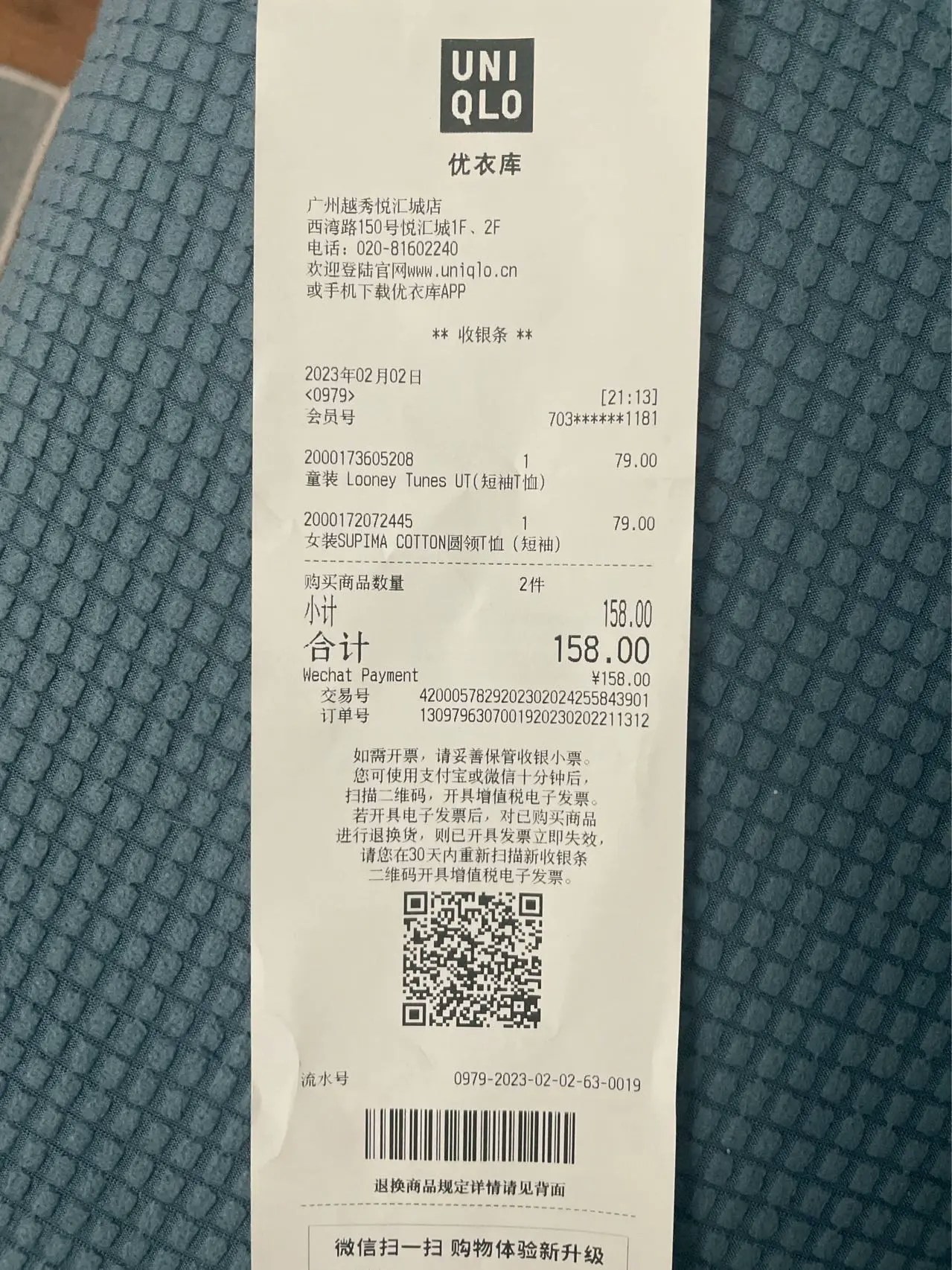 如果您需要从文档中提取结构化信息:
```python theme={null}
from xparse_client import (
Pipeline,
LocalSource,
LocalDestination,
Stage,
ParseConfig,
ExtractConfig
)
# 创建数据源
source = LocalSource(
directory='./documents',
pattern=['*.pdf']
)
# 创建目标存储
destination = LocalDestination(
output_dir='./output'
)
# 创建解析配置
parse_config = ParseConfig(
provider='textin'
)
# 创建抽取配置
extract_config = ExtractConfig(
schema={
"type": "object",
"properties": {
"商品": {
"type": ["string", "null"],
"description": "商品名称"
},
"商品列表": {
"type": "array",
"description": "商品列表",
"items": {
"type": "object",
"properties": {
"名称": {
"type": ["string", "null"],
"description": "商品名称"
},
"类型": {
"type": ["string", "null"],
"description": "商品类型"
}
},
"required": ["名称", "类型"]
}
}
},
"required": ["商品", "商品列表"]
},
generate_citations=False,
stamp=False
)
# 创建 Pipeline
pipeline = Pipeline(
source=source,
destination=destination,
api_base_url='https://api.textin.com/api/xparse',
api_headers={
'x-ti-app-id': 'your-app-id',
'x-ti-secret-code': 'your-secret-code'
},
stages=[
Stage(
type='parse',
config=parse_config
),
Stage(
type='extract',
config=extract_config
)
]
)
pipeline.run()
```
### 示例 5:处理单个文件并获取统计信息
如果您需要处理单个文件并获取详细的统计信息:
```python theme={null}
from xparse_client import LocalSource, LocalDestination, Pipeline, Stage, ParseConfig, ChunkConfig, EmbedConfig
# 创建 pipeline
source = LocalSource(directory='./docs', pattern=['*.pdf'])
destination = LocalDestination(output_dir='./output')
parse_config = ParseConfig(
provider='textin'
)
chunk_config = ChunkConfig(
strategy='by_page',
max_characters=2048,
overlap=100
)
embed_config = EmbedConfig(
provider='qwen',
model_name='text-embedding-v4'
)
pipeline = Pipeline(
source=source,
destination=destination,
api_base_url='https://api.textin.com/api/xparse',
api_headers={
'x-ti-app-id': 'your-app-id',
'x-ti-secret-code': 'your-secret-code'
},
stages=[
Stage(
type='parse',
config=parse_config
),
Stage(
type='chunk',
config=chunk_config
),
Stage(
type='embed',
config=embed_config
)
]
)
# 处理单个文件并获取统计信息
file_path = 'document.pdf'
file_bytes = source.read_file(file_path)
result = pipeline.process_with_pipeline(file_bytes, file_path)
if result:
elements, stats = result
print(f"原始元素: {stats.original_elements}")
print(f"分块后: {stats.chunked_elements}")
print(f"向量化: {stats.embedded_elements}")
print(f"使用配置:")
# 从 stats.stages 中获取配置信息
for stage in stats.stages:
if stage['type'] == 'chunk':
print(f" - 分块策略: {stage['config'].get('strategy', 'N/A')}")
elif stage['type'] == 'embed':
print(f" - 向量模型: {stage['config'].get('model_name', 'N/A')}")
# 写入目的地
metadata = {'file_name': file_path}
pipeline.destination.write(elements, metadata)
```
## 查看结果
### 本地文件输出
如果使用本地文件系统作为目标存储,处理结果会保存为 JSON 文件:
```json theme={null}
[
{
"element_id": "5f84a1db7c9f4ad65f84a1db7c9f4ad65f84a1db7c9f4ad65f84a1db7c9f4ad6",
"type": "CompositeElement",
"metadata": {
"filename": "example.pdf",
"filetype": "application/pdf",
"last_modified": "1758624866230",
"page_number": 1,
"page_width": 1191,
"page_height": 1684,
"orig_elements": "eJy ... Base64-encoded gzip+UTF-8 string ... x8=",
"is_continuation": false,
"data_source": {
"record_locator": {
"protocol": "file",
"remote_file_path": "/projects/demo/example.pdf"
},
"url": "file:///projects/demo/example.pdf",
"version": "1758624866230967485",
"date_created": "1764555574237",
"date_modified": "1758624866230",
"date_processed": "1764742970688"
}
},
"text": "文本内容...",
"embeddings": [0.1, 0.2, 0.3, 0.4, ...]
},
...
]
```
### Milvus 向量数据库
如果使用 Milvus 作为目标存储,向量数据会直接存储到集合中,您可以使用 Milvus 客户端进行查询:
```python theme={null}
from pymilvus import MilvusClient
# 连接 Milvus
client = MilvusClient(uri='./milvus_pipeline.db')
# 查询向量
results = client.search(
collection_name='documents',
data=[[0.1, 0.2, 0.3, ...]], # 查询向量
limit=5
)
print(results)
```
## API选择指南
xParse提供了多种API接口,适用于不同的使用场景:
### Pipeline API
**适用场景**:
* 需要组合多个处理阶段(parse + chunk + embed)
* 需要组合解析和抽取(parse + extract)
* 需要批量处理文档
* 需要将结果存储到向量数据库
**API文档**:[Pipeline API](/api-reference/endpoint/pipeline)
### Parse同步API
**适用场景**:
* 只需要文档解析功能
* 需要同步获取结果
* 处理单个文档或小文件(\<10MB)
**API文档**:[Parse同步API](/api-reference/endpoint/parse-sync)
### Parse异步API
**适用场景**:
* 处理大文件(>10MB)或批量文件
* 需要异步处理,避免长时间等待
* 需要webhook回调通知
**API文档**:[Parse异步API](/api-reference/endpoint/parse-async)
### Extract同步API
**适用场景**:
* 只需要抽取功能
* 不需要保留解析结果
* 处理单个文档
**API文档**:[Extract同步API](/api-reference/endpoint/extract-sync)
**使用教程**:详细的使用示例和最佳实践请参考[API使用指南](/pipeline/tutorial/standalone-api-tutorial)。
### 选择建议
| 需求 | 推荐API |
| ------------- | ------------ |
| 解析 + 分块 + 向量化 | Pipeline API |
| 解析 + 抽取 | Pipeline API |
| 仅解析(小文件) | Parse同步API |
| 仅解析(大文件/批量) | Parse异步API |
| 仅抽取 | Extract同步API |
## 下一步
* **了解[文档元素和元数据](/pipeline/elements-metadata)**:了解 Pipeline 处理后的数据结构
* **深入了解核心模块**:
* [文档解析(Parse)](/pipeline/parse) - 了解如何配置解析参数
* [文本分块(Chunk)](/pipeline/chunk) - 了解分块策略和参数配置
* [向量化(Embed)](/pipeline/embed) - 了解向量模型选择和配置
* [信息抽取(Extract)](/pipeline/extract) - 了解如何配置抽取参数
* **阅读[Agent/RAG 实战教程](/pipeline/tutorial/overview)**:了解如何使用 xParse 构建完整的 RAG 应用与 LangChain Agent
* **查看[API 文档](/api-reference/endpoint/pipeline)**:了解 Pipeline API 的详细参数和返回格式
如果您在使用过程中遇到问题,可以查看 [故障排除指南](#故障排除) 或联系技术支持。
## 故障排除
### API 连接失败
* 检查 `api_base_url` 是否正确(应为 `https://api.textin.com/api/xparse`)
* 确认 `x-ti-app-id` 和 `x-ti-secret-code` 配置正确
* 确认网络连接正常
### S3 连接失败
* 验证 endpoint、access\_key、secret\_key 是否正确
* 确认 bucket 存在且有访问权限
* 检查网络连接和防火墙设置
### Milvus 写入失败
* 检查向量维度是否匹配(当前 Pipeline API 使用 1024 维度)
* 确认集合中包含必需字段:`element_id`、`text`、`record_id`、`embeddings`、`metadata`
* 查看 Milvus 日志获取详细错误信息
### 本地文件找不到
* 确认文件路径正确
* 检查文件匹配模式(pattern)是否正确
* 验证文件权限
### 处理速度慢
* 考虑使用更高性能的向量模型(如 `text-embedding-v4`)
* 调整分块策略,减少分块数量
* 检查网络连接速度
如果您需要从文档中提取结构化信息:
```python theme={null}
from xparse_client import (
Pipeline,
LocalSource,
LocalDestination,
Stage,
ParseConfig,
ExtractConfig
)
# 创建数据源
source = LocalSource(
directory='./documents',
pattern=['*.pdf']
)
# 创建目标存储
destination = LocalDestination(
output_dir='./output'
)
# 创建解析配置
parse_config = ParseConfig(
provider='textin'
)
# 创建抽取配置
extract_config = ExtractConfig(
schema={
"type": "object",
"properties": {
"商品": {
"type": ["string", "null"],
"description": "商品名称"
},
"商品列表": {
"type": "array",
"description": "商品列表",
"items": {
"type": "object",
"properties": {
"名称": {
"type": ["string", "null"],
"description": "商品名称"
},
"类型": {
"type": ["string", "null"],
"description": "商品类型"
}
},
"required": ["名称", "类型"]
}
}
},
"required": ["商品", "商品列表"]
},
generate_citations=False,
stamp=False
)
# 创建 Pipeline
pipeline = Pipeline(
source=source,
destination=destination,
api_base_url='https://api.textin.com/api/xparse',
api_headers={
'x-ti-app-id': 'your-app-id',
'x-ti-secret-code': 'your-secret-code'
},
stages=[
Stage(
type='parse',
config=parse_config
),
Stage(
type='extract',
config=extract_config
)
]
)
pipeline.run()
```
### 示例 5:处理单个文件并获取统计信息
如果您需要处理单个文件并获取详细的统计信息:
```python theme={null}
from xparse_client import LocalSource, LocalDestination, Pipeline, Stage, ParseConfig, ChunkConfig, EmbedConfig
# 创建 pipeline
source = LocalSource(directory='./docs', pattern=['*.pdf'])
destination = LocalDestination(output_dir='./output')
parse_config = ParseConfig(
provider='textin'
)
chunk_config = ChunkConfig(
strategy='by_page',
max_characters=2048,
overlap=100
)
embed_config = EmbedConfig(
provider='qwen',
model_name='text-embedding-v4'
)
pipeline = Pipeline(
source=source,
destination=destination,
api_base_url='https://api.textin.com/api/xparse',
api_headers={
'x-ti-app-id': 'your-app-id',
'x-ti-secret-code': 'your-secret-code'
},
stages=[
Stage(
type='parse',
config=parse_config
),
Stage(
type='chunk',
config=chunk_config
),
Stage(
type='embed',
config=embed_config
)
]
)
# 处理单个文件并获取统计信息
file_path = 'document.pdf'
file_bytes = source.read_file(file_path)
result = pipeline.process_with_pipeline(file_bytes, file_path)
if result:
elements, stats = result
print(f"原始元素: {stats.original_elements}")
print(f"分块后: {stats.chunked_elements}")
print(f"向量化: {stats.embedded_elements}")
print(f"使用配置:")
# 从 stats.stages 中获取配置信息
for stage in stats.stages:
if stage['type'] == 'chunk':
print(f" - 分块策略: {stage['config'].get('strategy', 'N/A')}")
elif stage['type'] == 'embed':
print(f" - 向量模型: {stage['config'].get('model_name', 'N/A')}")
# 写入目的地
metadata = {'file_name': file_path}
pipeline.destination.write(elements, metadata)
```
## 查看结果
### 本地文件输出
如果使用本地文件系统作为目标存储,处理结果会保存为 JSON 文件:
```json theme={null}
[
{
"element_id": "5f84a1db7c9f4ad65f84a1db7c9f4ad65f84a1db7c9f4ad65f84a1db7c9f4ad6",
"type": "CompositeElement",
"metadata": {
"filename": "example.pdf",
"filetype": "application/pdf",
"last_modified": "1758624866230",
"page_number": 1,
"page_width": 1191,
"page_height": 1684,
"orig_elements": "eJy ... Base64-encoded gzip+UTF-8 string ... x8=",
"is_continuation": false,
"data_source": {
"record_locator": {
"protocol": "file",
"remote_file_path": "/projects/demo/example.pdf"
},
"url": "file:///projects/demo/example.pdf",
"version": "1758624866230967485",
"date_created": "1764555574237",
"date_modified": "1758624866230",
"date_processed": "1764742970688"
}
},
"text": "文本内容...",
"embeddings": [0.1, 0.2, 0.3, 0.4, ...]
},
...
]
```
### Milvus 向量数据库
如果使用 Milvus 作为目标存储,向量数据会直接存储到集合中,您可以使用 Milvus 客户端进行查询:
```python theme={null}
from pymilvus import MilvusClient
# 连接 Milvus
client = MilvusClient(uri='./milvus_pipeline.db')
# 查询向量
results = client.search(
collection_name='documents',
data=[[0.1, 0.2, 0.3, ...]], # 查询向量
limit=5
)
print(results)
```
## API选择指南
xParse提供了多种API接口,适用于不同的使用场景:
### Pipeline API
**适用场景**:
* 需要组合多个处理阶段(parse + chunk + embed)
* 需要组合解析和抽取(parse + extract)
* 需要批量处理文档
* 需要将结果存储到向量数据库
**API文档**:[Pipeline API](/api-reference/endpoint/pipeline)
### Parse同步API
**适用场景**:
* 只需要文档解析功能
* 需要同步获取结果
* 处理单个文档或小文件(\<10MB)
**API文档**:[Parse同步API](/api-reference/endpoint/parse-sync)
### Parse异步API
**适用场景**:
* 处理大文件(>10MB)或批量文件
* 需要异步处理,避免长时间等待
* 需要webhook回调通知
**API文档**:[Parse异步API](/api-reference/endpoint/parse-async)
### Extract同步API
**适用场景**:
* 只需要抽取功能
* 不需要保留解析结果
* 处理单个文档
**API文档**:[Extract同步API](/api-reference/endpoint/extract-sync)
**使用教程**:详细的使用示例和最佳实践请参考[API使用指南](/pipeline/tutorial/standalone-api-tutorial)。
### 选择建议
| 需求 | 推荐API |
| ------------- | ------------ |
| 解析 + 分块 + 向量化 | Pipeline API |
| 解析 + 抽取 | Pipeline API |
| 仅解析(小文件) | Parse同步API |
| 仅解析(大文件/批量) | Parse异步API |
| 仅抽取 | Extract同步API |
## 下一步
* **了解[文档元素和元数据](/pipeline/elements-metadata)**:了解 Pipeline 处理后的数据结构
* **深入了解核心模块**:
* [文档解析(Parse)](/pipeline/parse) - 了解如何配置解析参数
* [文本分块(Chunk)](/pipeline/chunk) - 了解分块策略和参数配置
* [向量化(Embed)](/pipeline/embed) - 了解向量模型选择和配置
* [信息抽取(Extract)](/pipeline/extract) - 了解如何配置抽取参数
* **阅读[Agent/RAG 实战教程](/pipeline/tutorial/overview)**:了解如何使用 xParse 构建完整的 RAG 应用与 LangChain Agent
* **查看[API 文档](/api-reference/endpoint/pipeline)**:了解 Pipeline API 的详细参数和返回格式
如果您在使用过程中遇到问题,可以查看 [故障排除指南](#故障排除) 或联系技术支持。
## 故障排除
### API 连接失败
* 检查 `api_base_url` 是否正确(应为 `https://api.textin.com/api/xparse`)
* 确认 `x-ti-app-id` 和 `x-ti-secret-code` 配置正确
* 确认网络连接正常
### S3 连接失败
* 验证 endpoint、access\_key、secret\_key 是否正确
* 确认 bucket 存在且有访问权限
* 检查网络连接和防火墙设置
### Milvus 写入失败
* 检查向量维度是否匹配(当前 Pipeline API 使用 1024 维度)
* 确认集合中包含必需字段:`element_id`、`text`、`record_id`、`embeddings`、`metadata`
* 查看 Milvus 日志获取详细错误信息
### 本地文件找不到
* 确认文件路径正确
* 检查文件匹配模式(pattern)是否正确
* 验证文件权限
### 处理速度慢
* 考虑使用更高性能的向量模型(如 `text-embedding-v4`)
* 调整分块策略,减少分块数量
* 检查网络连接速度