> ## Documentation Index
> Fetch the complete documentation index at: https://docs.textin.com/llms.txt
> Use this file to discover all available pages before exploring further.
# 信息抽取 - Extract
> 了解 xParse 中的信息抽取模块,从解析后的文档中提取结构化信息
## 概念
信息抽取是将解析后的文档内容提取并转换为结构化数据的过程。通过定义 JSON Schema,您可以指定要抽取的字段名称、类型和描述,系统会根据您定义的配置进行抽取。
与简单提取文本不同,xParse 的信息抽取功能能够:
* **结构化提取**:根据定义的 JSON Schema 提取结构化数据
* **坐标定位**:支持返回每个字段在文档中的坐标位置
* **印章识别**:支持识别文档中的印章信息
* **类型转换**:根据字段类型自动进行格式转换
## 用途
信息抽取的主要用途:
* **表单数据提取**:从发票、合同、订单等表单中提取关键信息
* **结构化数据生成**:将非结构化文档转换为结构化 JSON 数据
* **数据录入自动化**:自动提取文档数据并录入到业务系统
* **信息验证**:提取信息后进行数据验证和校验
* **文档分析**:提取关键信息用于文档分析和处理
## 参数说明
### schema
**类型**: `object`
**必填**: 是
JSON Schema定义,用于指定要抽取的字段结构。参考[JSON Schema结构说明](#json-schema-结构说明)了解详细的schema定义方法。
Schema 必须遵循 JSON Schema 规范,最外层 type 必须为 "object",properties 中定义要抽取的字段。
### generate\_citations
**类型**: `boolean`
**必填**: 否
**默认值**: `false`
是否生成引用信息(坐标位置)。
当设置为 `true` 时,返回结果中的 `citations` 字段会包含每个抽取字段的坐标信息,包括:
* **value**:该字段的抽取结果
* **bounding\_regions**:抽取结果对应的坐标位置
* **page\_number**:所在页码,从1开始
* **text**:边界框所在区域内的文本内容
* **position**:坐标位置,长度为8的数组,表示四个顶点的像素坐标 \[左上x, 左上y, 右上x, 右上y, 右下x, 右下y, 左下x, 左下y]
### stamp
**类型**: `boolean`
**必填**: 否
**默认值**: `false`
是否调用印章识别。
当设置为 `true` 时,返回结果中的 `stamps` 字段会包含文档中的印章信息,包括:
* **color**:当前印章颜色(红色、蓝色、黑色、其他)
* **position**:印章的坐标信息
* **stamp\_shape**:当前印章形状(圆章、椭圆章、方章、三角章、菱形章、其他)
* **type**:当前印章类型(公章、个人章、专用章、其他、合同专用章、财务专用章、发票专用章、业务专用章)
* **value**:印章的文本内容
## JSON Schema 结构说明
我们使用[JSON Schema](https://json-schema.org/)来定义要抽取的数据结构,在遵循 schema 规范的基础上,剔除了一些不必要的字段,文档抽取使用的 schema 字段如下:
* **type**:schema的类型,最外层固定为`object`
* **properties**:抽取字段的集合
* **\**:要抽取的字段名称,由用户自定义,每个字段包含以下信息:
* **type**:要抽取的字段类型,参考[支持的字段类型](#json-schema-支持的字段类型)列表
* **description**:要抽取的字段描述
* **enum**:当type为`enum`时,该字段表示抽取字段的枚举值列表
* **items**:当type为`array`时,该字段表示要抽取的列表中的字段集合,与`properties`类似
* **required**:指定抽取必要字段,其顺序表达了抽取输出的字段顺序,仅在type为`object`时需要。
在定义要抽取的数据时,您需要为每个字段提供一个名称,以及确定该字段的类型。您还可以添加可选的字段描述为大模型提供更多的上下文,帮助文档抽取准确了解需要从文档中查找和提取哪些信息。字段名称和描述越具体、表义越明确,文档抽取就越能准确地识别和抽取文档中的正确数据。
### JSON Schema 结构示例
```json theme={null}
{
"type": "object",
"properties": {
"field_name": {
"type": ["string","null"],
"description": "Field description"
},
"table_name": {
"type": "array",
"description": "Table description",
"items": {
"type": "object",
"properties": {
"name": {
"type": ["string","null"],
"description": ""
},
"category": {
"type": ["string","null"],
"description": ""
}
},
"required": [
"name",
"category"
]
}
}
},
"required": [
"field_name",
"table_name"
]
}
```
### JSON schema 支持的字段类型
* string:字符串
* number:数字
* integer:整数
* enum:枚举
* object:对象,对象内可以包含以下类型:string、number、integer、enum。
* array:数组,数组内可以包含以下类型:string、number、integer、enum、object。
请注意,在JSON schema中array、object类型均支持层级嵌套结构,以便于抽取如表格或者具有多个属性的实体对象。目前文档抽取仅支持最多**不超过3级**的嵌套。
type可以设置为字符串(如`"type": "string"`)或者包含null的数组(如`"type": ["string", "null"]`),即使type不带null,接口底层也会默认带上null,当抽取不到数据时,接口统一返回null值。
### JSON schema 支持的字段数量
为了获得最佳性能,保障抽取的精度和速度,在JSON schema中包含的最低层级(叶子节点)字段数量限制总计应**不超过100个**。
## 输出结果说明
extract 阶段返回一个抽取结果对象,包含以下字段:
* **success\_count**:成功处理的文档页数
* **extracted\_schema**:结构化的抽取结果,以json格式返回,与抽取时传入的schema定义的结构一致
* **citations**:抽取结果的详细信息,包含坐标位置(仅在 generate\_citations=true 时返回),结构与schema定义一致
* **stamps**:印章相关信息(仅在 stamp=true 且文档中包含印章时返回)
* **pages**:文档页面相关信息
## Extract API说明
xParse提供了两种方式使用Extract功能:
### 1. Pipeline中的Extract节点
在Pipeline API中使用Extract作为第二个stage,必须与Parse组合使用。
**适用场景**:
* 需要在自动化工作流中使用抽取功能,与连接器生态集成
* 需要批量处理文档
**API文档**:[Pipeline API](/api-reference/endpoint/pipeline)
**使用限制**:
* Extract必须与Parse组合使用
* Extract必须在Parse之后
* 不支持与chunk、embed同时使用
### 2. Extract同步API
直接调用Extract API,内部会自动调用Parse,然后进行抽取。
**适用场景**:
* 只需要抽取功能
* 不需要保留解析结果
* 处理单个文档
**API文档**:[Extract同步API](/api-reference/endpoint/extract-sync)
**使用教程**:详细的使用示例和最佳实践请参考[API使用指南](/pipeline/tutorial/standalone-api-tutorial#extract-同步-api)。
### 对比和选择建议
| 特性 | Pipeline Extract | Extract API |
| ---- | ---------------- | ----------- |
| 适用场景 | 需要批量处理 | 只需要抽取 |
| 批量处理 | 支持 | 需要自行实现 |
**选择建议**:
* **只需要抽取结果**:两种方式都可以,根据是否需要批量处理选择
* **批量处理**:使用Pipeline API(parse + extract)
## 返回结果示例
这里为您提供了一份Textin官方示例图片,您可以点击下载使用:[文档抽取png示例.png](https://web-api.textin.com/open/image/download?filename=54efc36a05cf475aa6b39137b0717726)
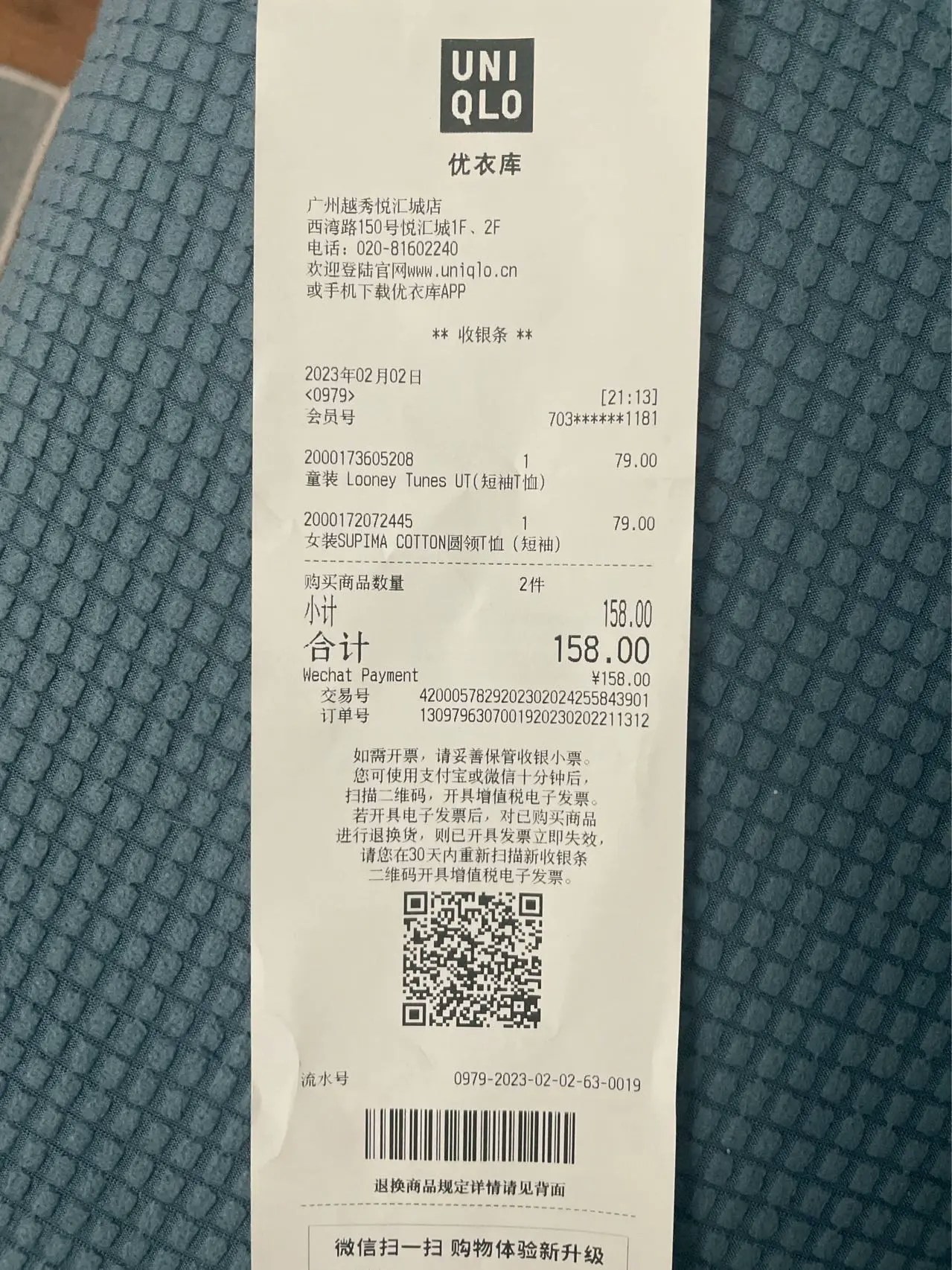 ### Pipeline Extract节点返回示例
```json theme={null}
{
"code": 200,
"message": "success",
"x_request_id": "req_1234567890abcdef",
"data": {
"extract_result": {
"success_count": 1,
"extracted_schema": {
"商品": "童装 Looney Tunes UT(短袖T恤)女装SUPIMA COTTON圆领T恤(短袖)"
},
"citations": {
"商品": {
"value": "童装 Looney Tunes UT(短袖T恤)女装SUPIMA COTTON圆领T恤(短袖)",
"bounding_regions": [
{
"page_number": 1,
"position": [137, 599, 1129, 599, 1129, 625, 182, 625],
"text": "童装 Looney Tunes UT(短袖T恤)"
}
]
}
},
"pages": [
{
"page_number": 1,
"image_id": "62bfe3c3a8e9c9cf.jpg",
"height": 1824,
"width": 600,
"angle": 0,
"status": "Success",
"durations": 930.178466796875
}
]
},
"stats": {
"success_count": 1,
"original_elements": 10,
"chunked_elements": 0,
"embedded_elements": 0,
"stages": [
{"type": "parse", "config": {"provider": "textin"}},
{"type": "extract", "config": {"schema": {...}, "generate_citations": false, "stamp": false}}
]
}
}
}
```
### Extract API返回示例
```json theme={null}
{
"code": 200,
"msg": "success",
"data": {
"file_id": "xxx",
"status": "completed",
"result": {
"success_count": 1,
"extracted_schema": {
"商品": "童装 Looney Tunes UT(短袖T恤)女装SUPIMA COTTON圆领T恤(短袖)"
},
"citations": {
"商品": {
"value": "童装 Looney Tunes UT(短袖T恤)女装SUPIMA COTTON圆领T恤(短袖)",
"bounding_regions": [
{
"page_number": 1,
"position": [137, 599, 1129, 599, 1129, 625, 182, 625],
"text": "童装 Looney Tunes UT(短袖T恤)"
}
]
}
},
"pages": [
{
"page_number": 1,
"image_id": "62bfe3c3a8e9c9cf.jpg",
"height": 1824,
"width": 600,
"angle": 0,
"status": "Success",
"durations": 930.178466796875
}
]
}
}
}
```
## 使用示例
### 示例 1:在Pipeline中使用Extract
```python theme={null}
from xparse_client import (
Pipeline,
LocalSource,
LocalDestination,
Stage,
ParseConfig,
ExtractConfig
)
# 创建数据源
source = LocalSource(
directory='./documents'
)
# 创建目标存储
destination = LocalDestination(
output_dir='./output'
)
# 创建解析配置
parse_config = ParseConfig(
provider='textin'
)
# 创建抽取配置
extract_config = ExtractConfig(
schema={
"type": "object",
"properties": {
"商品": {
"type": ["string", "null"],
"description": "商品名称"
},
"商品列表": {
"type": "array",
"description": "商品列表",
"items": {
"type": "object",
"properties": {
"名称": {
"type": ["string", "null"],
"description": "商品名称"
},
"类型": {
"type": ["string", "null"],
"description": "商品类型"
}
},
"required": ["名称", "类型"]
}
}
},
"required": ["商品", "商品列表"]
},
generate_citations=False,
stamp=False
)
# 创建 Pipeline
pipeline = Pipeline(
source=source,
destination=destination,
api_base_url='https://api.textin.com/api/xparse',
api_headers={
'x-ti-app-id': 'your-app-id',
'x-ti-secret-code': 'your-secret-code'
},
stages=[
Stage(
type='parse',
config=parse_config
),
Stage(
type='extract',
config=extract_config
)
]
)
pipeline.run()
```
### 示例 2:使用Extract API
```python theme={null}
import requests
url = "https://api.textin.com/api/xparse/extract/sync"
# 准备文件
with open('document.pdf', 'rb') as f:
file_content = f.read()
# 准备配置
extract_config = {
"schema": {
"type": "object",
"properties": {
"商品": {
"type": ["string", "null"],
"description": "商品名称"
},
"商品列表": {
"type": "array",
"description": "商品列表",
"items": {
"type": "object",
"properties": {
"名称": {
"type": ["string", "null"],
"description": "商品名称"
},
"类型": {
"type": ["string", "null"],
"description": "商品类型"
}
},
"required": ["名称", "类型"]
}
}
},
"required": ["商品", "商品列表"]
},
"generate_citations": False,
"stamp": False
}
# 发送请求
files = {'file': ('document.pdf', file_content, 'application/pdf')}
data = {
'extract_config': json.dumps(extract_config)
}
headers = {
'x-ti-app-id': 'your-app-id',
'x-ti-secret-code': 'your-secret-code'
}
response = requests.post(url, files=files, data=data, headers=headers)
result = response.json()
print(result)
```
### 示例 3:启用坐标信息和印章识别
```python theme={null}
from xparse_client import ExtractConfig
# 创建抽取配置,启用坐标信息和印章识别
extract_config = ExtractConfig(
schema={
"type": "object",
"properties": {
"发票号码": {
"type": ["string", "null"],
"description": "发票号码"
},
"金额": {
"type": ["number", "null"],
"description": "发票金额"
}
},
"required": ["发票号码", "金额"]
},
generate_citations=True, # 启用坐标信息
stamp=True # 启用印章识别
)
```
## 相关文档
* [文档元素和元数据](/pipeline/elements-metadata) - 了解解析后的元素结构
* [文档解析 - Parse](/pipeline/parse) - 了解如何配置解析参数
* [Pipeline API](/api-reference/endpoint/pipeline) - 了解Pipeline API的详细参数
* [Extract同步API](/api-reference/endpoint/extract-sync) - 了解Extract API的详细参数
### Pipeline Extract节点返回示例
```json theme={null}
{
"code": 200,
"message": "success",
"x_request_id": "req_1234567890abcdef",
"data": {
"extract_result": {
"success_count": 1,
"extracted_schema": {
"商品": "童装 Looney Tunes UT(短袖T恤)女装SUPIMA COTTON圆领T恤(短袖)"
},
"citations": {
"商品": {
"value": "童装 Looney Tunes UT(短袖T恤)女装SUPIMA COTTON圆领T恤(短袖)",
"bounding_regions": [
{
"page_number": 1,
"position": [137, 599, 1129, 599, 1129, 625, 182, 625],
"text": "童装 Looney Tunes UT(短袖T恤)"
}
]
}
},
"pages": [
{
"page_number": 1,
"image_id": "62bfe3c3a8e9c9cf.jpg",
"height": 1824,
"width": 600,
"angle": 0,
"status": "Success",
"durations": 930.178466796875
}
]
},
"stats": {
"success_count": 1,
"original_elements": 10,
"chunked_elements": 0,
"embedded_elements": 0,
"stages": [
{"type": "parse", "config": {"provider": "textin"}},
{"type": "extract", "config": {"schema": {...}, "generate_citations": false, "stamp": false}}
]
}
}
}
```
### Extract API返回示例
```json theme={null}
{
"code": 200,
"msg": "success",
"data": {
"file_id": "xxx",
"status": "completed",
"result": {
"success_count": 1,
"extracted_schema": {
"商品": "童装 Looney Tunes UT(短袖T恤)女装SUPIMA COTTON圆领T恤(短袖)"
},
"citations": {
"商品": {
"value": "童装 Looney Tunes UT(短袖T恤)女装SUPIMA COTTON圆领T恤(短袖)",
"bounding_regions": [
{
"page_number": 1,
"position": [137, 599, 1129, 599, 1129, 625, 182, 625],
"text": "童装 Looney Tunes UT(短袖T恤)"
}
]
}
},
"pages": [
{
"page_number": 1,
"image_id": "62bfe3c3a8e9c9cf.jpg",
"height": 1824,
"width": 600,
"angle": 0,
"status": "Success",
"durations": 930.178466796875
}
]
}
}
}
```
## 使用示例
### 示例 1:在Pipeline中使用Extract
```python theme={null}
from xparse_client import (
Pipeline,
LocalSource,
LocalDestination,
Stage,
ParseConfig,
ExtractConfig
)
# 创建数据源
source = LocalSource(
directory='./documents'
)
# 创建目标存储
destination = LocalDestination(
output_dir='./output'
)
# 创建解析配置
parse_config = ParseConfig(
provider='textin'
)
# 创建抽取配置
extract_config = ExtractConfig(
schema={
"type": "object",
"properties": {
"商品": {
"type": ["string", "null"],
"description": "商品名称"
},
"商品列表": {
"type": "array",
"description": "商品列表",
"items": {
"type": "object",
"properties": {
"名称": {
"type": ["string", "null"],
"description": "商品名称"
},
"类型": {
"type": ["string", "null"],
"description": "商品类型"
}
},
"required": ["名称", "类型"]
}
}
},
"required": ["商品", "商品列表"]
},
generate_citations=False,
stamp=False
)
# 创建 Pipeline
pipeline = Pipeline(
source=source,
destination=destination,
api_base_url='https://api.textin.com/api/xparse',
api_headers={
'x-ti-app-id': 'your-app-id',
'x-ti-secret-code': 'your-secret-code'
},
stages=[
Stage(
type='parse',
config=parse_config
),
Stage(
type='extract',
config=extract_config
)
]
)
pipeline.run()
```
### 示例 2:使用Extract API
```python theme={null}
import requests
url = "https://api.textin.com/api/xparse/extract/sync"
# 准备文件
with open('document.pdf', 'rb') as f:
file_content = f.read()
# 准备配置
extract_config = {
"schema": {
"type": "object",
"properties": {
"商品": {
"type": ["string", "null"],
"description": "商品名称"
},
"商品列表": {
"type": "array",
"description": "商品列表",
"items": {
"type": "object",
"properties": {
"名称": {
"type": ["string", "null"],
"description": "商品名称"
},
"类型": {
"type": ["string", "null"],
"description": "商品类型"
}
},
"required": ["名称", "类型"]
}
}
},
"required": ["商品", "商品列表"]
},
"generate_citations": False,
"stamp": False
}
# 发送请求
files = {'file': ('document.pdf', file_content, 'application/pdf')}
data = {
'extract_config': json.dumps(extract_config)
}
headers = {
'x-ti-app-id': 'your-app-id',
'x-ti-secret-code': 'your-secret-code'
}
response = requests.post(url, files=files, data=data, headers=headers)
result = response.json()
print(result)
```
### 示例 3:启用坐标信息和印章识别
```python theme={null}
from xparse_client import ExtractConfig
# 创建抽取配置,启用坐标信息和印章识别
extract_config = ExtractConfig(
schema={
"type": "object",
"properties": {
"发票号码": {
"type": ["string", "null"],
"description": "发票号码"
},
"金额": {
"type": ["number", "null"],
"description": "发票金额"
}
},
"required": ["发票号码", "金额"]
},
generate_citations=True, # 启用坐标信息
stamp=True # 启用印章识别
)
```
## 相关文档
* [文档元素和元数据](/pipeline/elements-metadata) - 了解解析后的元素结构
* [文档解析 - Parse](/pipeline/parse) - 了解如何配置解析参数
* [Pipeline API](/api-reference/endpoint/pipeline) - 了解Pipeline API的详细参数
* [Extract同步API](/api-reference/endpoint/extract-sync) - 了解Extract API的详细参数